
Technical Guidelines
In order for us to start setting up your website template,
we need you to do a few technical things.
We've put together this guide to help you with purchasing your domain name, your hosting, and a few other minor things. We will need all of this before we can start adapting your template.
VERY IMPORTANT: You will have to share your logins for the various platform accounts with us. Make sure to use something generic and not something you use for other more important accounts. You can always change your passwords once your website is live. Since you will share account information with us, please make sure that it's easy for us to login (disable two factor authentications etc until the website is live.
Registering Your Domain Name
This will be you website name, eg., authorname.com. You can use your name and last name, or something like sarahwrites.com. The possibilities are endless.
Sometimes the name you want to use has already been used. If this is the case, you may need to experiment with different names until you find one that suits your needs.
We Recommend: Namecheap
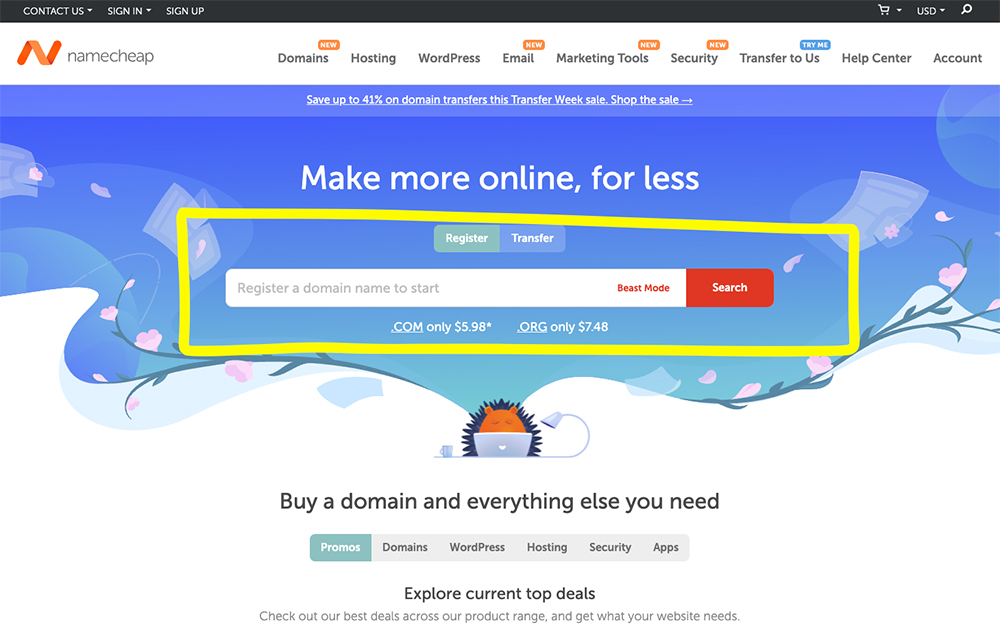
This is your first step! Just go to Namecheap, type in your domain (website) name, and click on "Search".
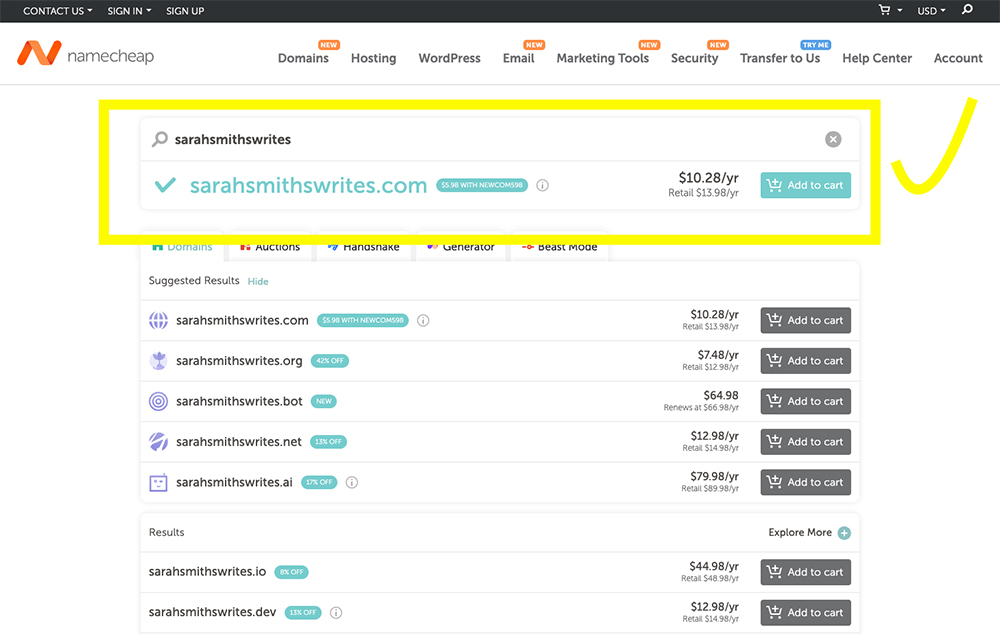
This will take you to a page where you can either purchase your domain, or it will tell you that your domain name isn't available. In this case they will give you other suggestions, or you will have to think of something new.
When you've found the perfect domain name, just add to cart, follow the steps, and you will be the proud owner of a new domain before you know it!
They will try to upsell you, but just ignore all of that. Just go to your cart and procceed with purchase.
Click Here to Watch a Video Walkthrough
Click Here to Watch a Video Walkthrough
Purchasing Your Hosting Package
Congrats on registering your domain name. Now we will need to buy a hosting a package!
Below we share three options for you to choose from.
You can also explore other hosting providers. We suggest looking at web hosting or shared hosting, inclusion of CPanel, automatic backups, and that email is included in the package.
**Generally we advise against using GoDaddy and Bluehost.
Our Recommendation: Siteground
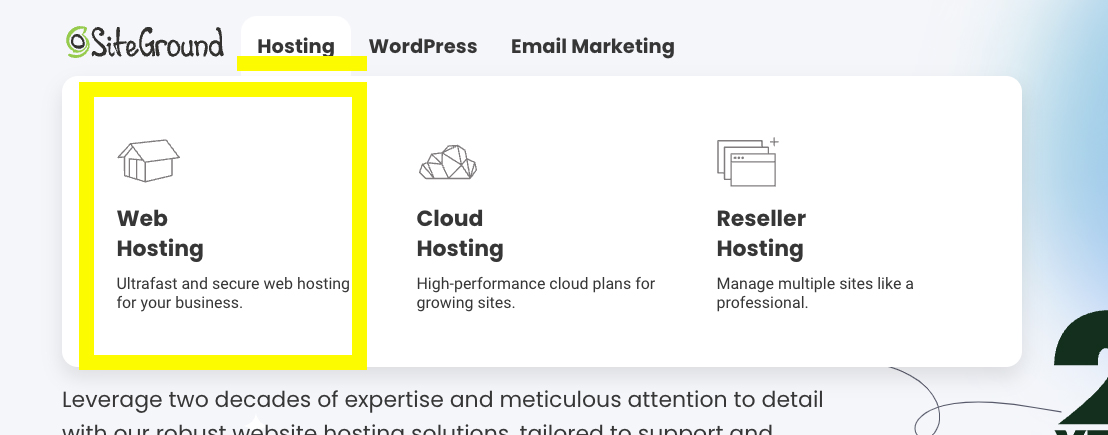
We also recommend using Web Hosting instead of WordPress hosting (as it gives you more freedom). Our button below will take you to the correct page. But see screenshot for menu selection on their website.
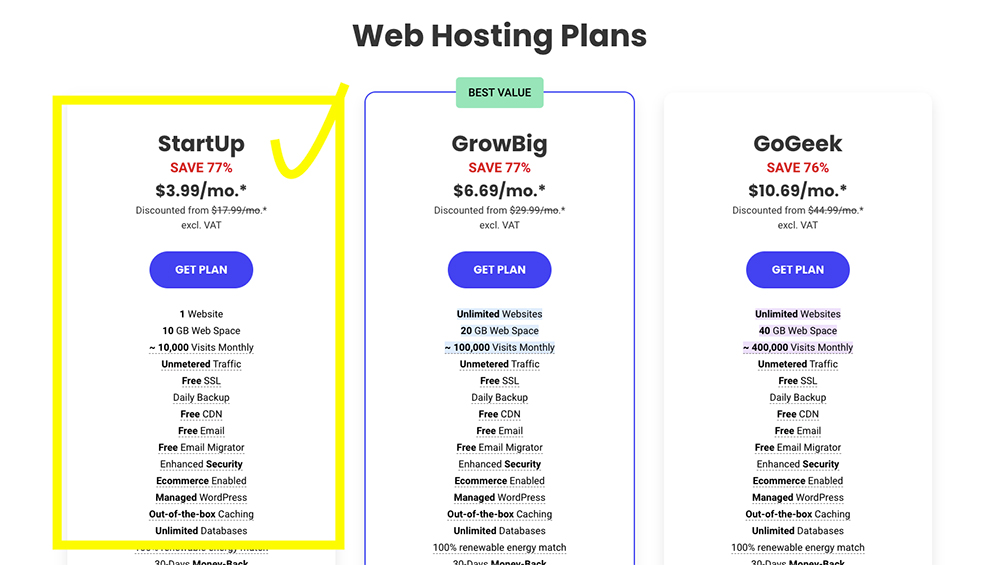
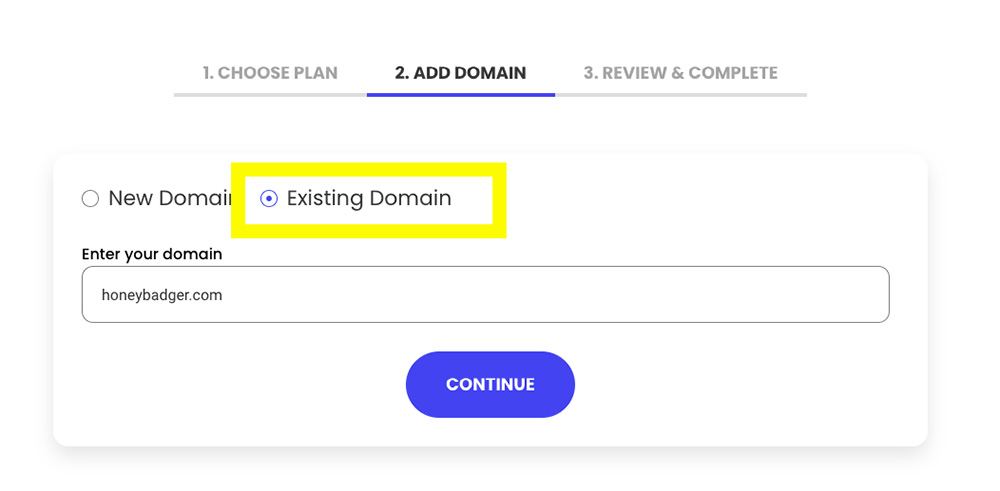
If you choose hosting with Siteground, we'd suggest starting with the "StartUp" plan. You don't need much more. You will be asked to either enter a new domain or an existing domain - you will select "existing" because you've already purchased your domain. Then just complete your details.
YOU DO NOT HAVE TO ADD ANY EXTRA SERVICES ON CHECKOUT!
Choose your pricing package on checkout.
Please make sure to look at their pricing terms.
Signing up will be $3.99 per month for the first year (prepaid purchase of a 12-month hosting plan). After your first year it will be their regular price of $17.99 per month.
Just click on "Get Plan" and follow the steps 🙂
Affordable Alternative: Namecheap
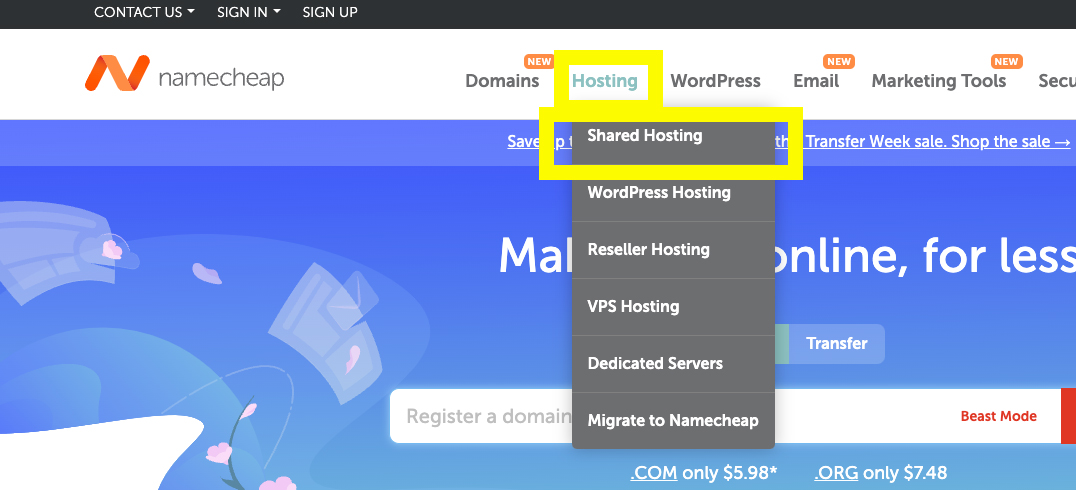
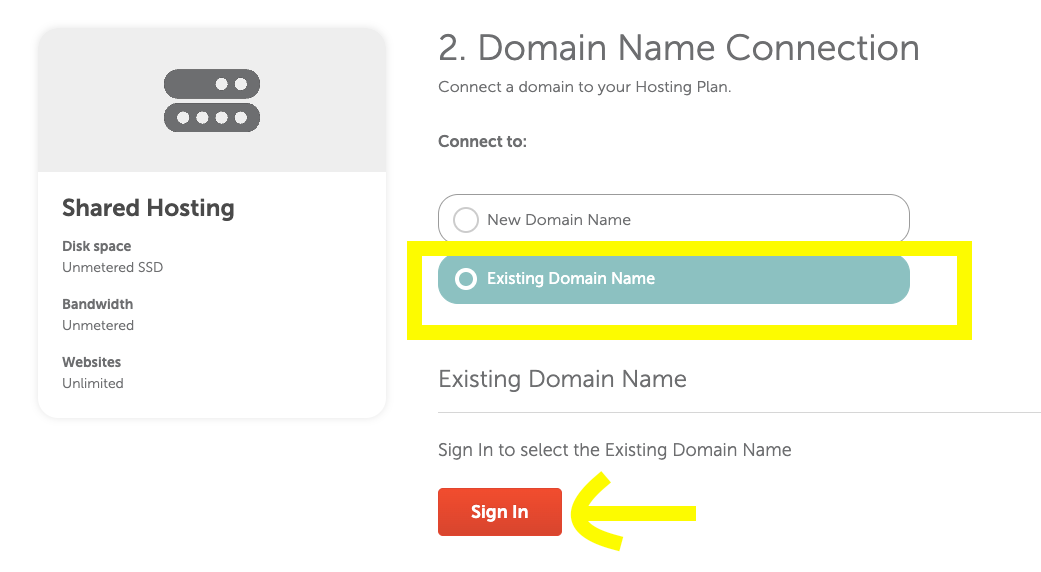
We also recommend using Shared Hosting instead of WordPress Hosting (as it gives you more freedom). Our button below will take you to the correct page. But see screenshot for menu selection on their website.
**We also suggest only using this option if you won't be adding a lot more content to your website (blog posts with large images/videos/more pages, etc).
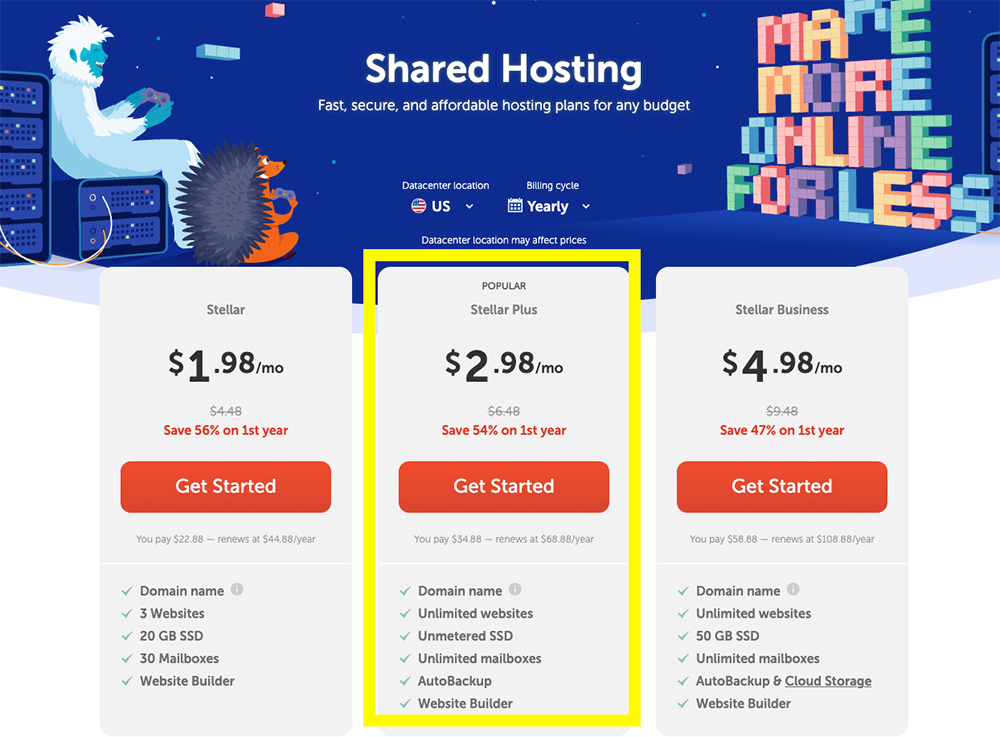
If you choose hosting with Namecheap, we'd suggest starting with the "Stellar Plus" plan. You don't need much more.
When choosing "Existing Domain Name" you will be asked to login and then you can just follow the steps.
Please make sure to look at their pricing terms.
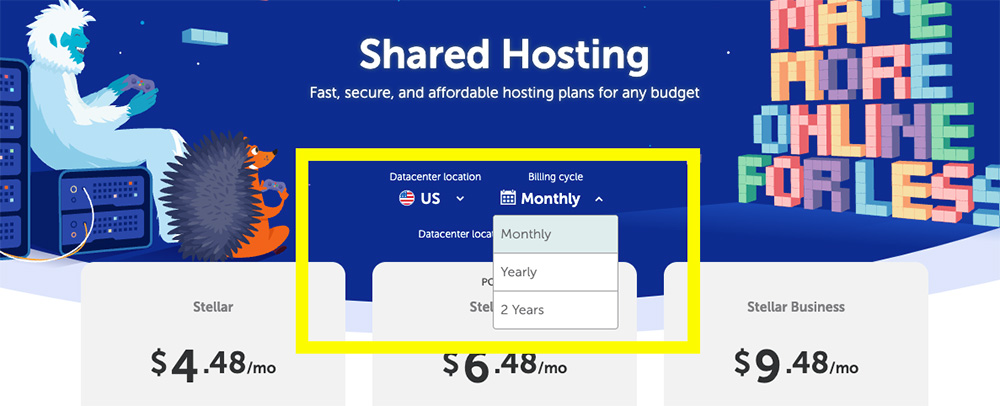
You have two options (see screenshots):
Billed Annually: Signing up will be $2.98 per month for the first year (prepaid purchase of a 12-month hosting plan). After your first year it will be their regular price of $6.48 per month.
Billed Monthly: This means they will bill you monthly, at the full price of $6.48 per month.
Just click on "Get Started" and follow the steps 🙂
Creating a Gmail Account
This step is quite straightforward. We need a Gmail Account from you to submit your website to Google, and to create a Google Analytics account.
VERY IMPORTANT: You will have to share the logins for this account with us. Make sure to use a generic password and not something you use for other accounts. You can always change your password once your website is live.
Since you will share this account information with us, please make sure that it's easy for us to login.
You might already have a Gmail account that you use for yourself - we recommend setting up a Gmail account specifically for your website. This way you will never have to share your personal email account with an external agency when doing things like Google Ads etc.
We usually suggest something like:
- yourwebsitenameonline@gmail.com
- yourwebsitenameanalytics@gmail.com
- yourwebsitenameweb@gmail.com
Learn More About Why You Need a Gmail Account

Newsletters
If you want to include a newsletter signup section on your website, you will have to create an account with a newsletter platform. You might not send newsletters now, but there's no harm in building that subscriber list.
You will find a variety of platforms to choose from. Choosing one comes down to your specific needs.
Some of the popular options our clients use are:
- MailChimp
- MailerLite
- Flodesk
- ActiveCampaign
- ConvertKit
- Klaviyo
MailerLite is a great 'free' option to start with. Just sign up for a free account and you can start to collect subscribers and send small newsletters. You can always upgrade your account later, or switch to another platform (you can export your subscribers and import them into your new account).
Note: with their free account, they add their logo to the bottom of your newsletter.
Now that you've done all your technical steps, you can either explore your branding or jump to the content intake form.
When completing our intake form, make sure you have all your content ready to upload (copy, images, colors, author photo, book images, fonts, book backgrounds, etc).